Enter the pay rate, contract and pay frequency Care App needs to work out pay, plus the details your payroll provider needs.
For managers
Each person needs a pay profile before Care App can work out their pay for your payroll provider. Staff do not fill this in themselves, and they cannot see it. The hourly rate, contract and pay frequency are what Care App needs. The tax details are passed on in the export files for your payroll provider.
Steps
- In the sidebar, open Finance and choose Finance. Open the Staff Profiles tab.
- Find the person under No profile set up and press Setup, or press Add Profile. To change an existing profile, press the pencil icon on their card.
- Enter the Hourly Rate (£) and choose the Contract Type: Full-time, Part-time, Zero hours or Bank.
- For full-time and part-time staff, enter Contracted Hours/Week and Annual Leave (days). For zero hours and bank staff, decide whether to tick Rolled-up holiday pay.
- Enter the Employment Start Date.
- Under NEW STARTER, if they started in this tax year, choose their Starter Declaration (A, B or C), or enter the pay and tax to date from their P45, or both.
- Choose the Pay Frequency: Weekly, Fortnightly, 4-Weekly or Monthly.
- Enter the NI Number and Tax Code.
- Under RTI / HMRC DETAILS, enter their name as HMRC has it, date of birth, gender, address and the NI Category letter. Most people are A Standard.
- Add pension details, weekend, bank holiday, sleep-in and waking night rates, and any student loan plan.
- Press Save Profile.
Good to know
- Enter the first name and surname as HMRC has them, so the export files match your payroll software.
- Amber warnings do not stop you saving: a missing starter declaration, or an NI number that does not look right (two letters, six numbers, then A, B, C or D). Your payroll provider will need these.
- When someone leaves, enter the Leaving Date and Leaving Reason and tell your payroll provider. See Payslips, P45s and P60s.
- Only the Management role can open Finance.
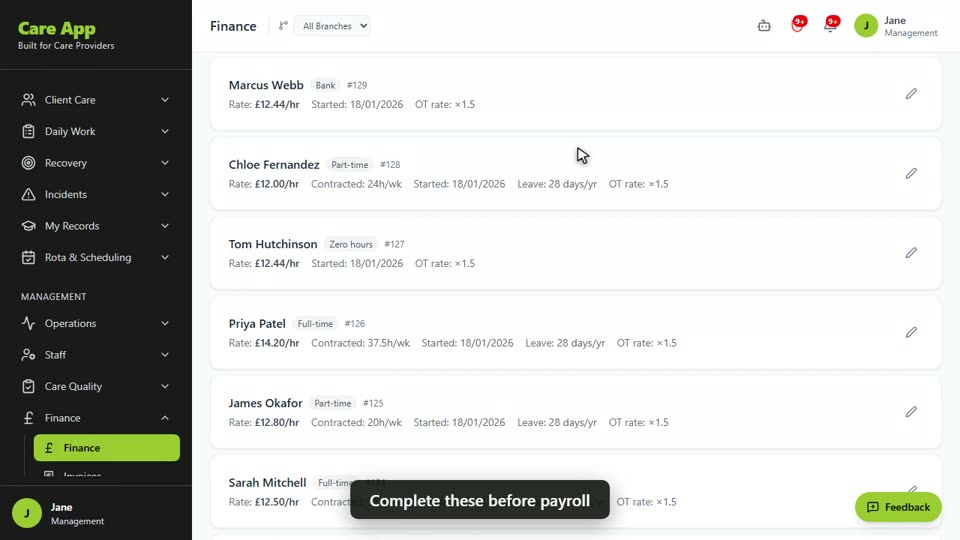
Watch the guide video: Video 15: Finance profiles, expenses and outgoings (2:21)
Videos were recorded in September 2026, so a few screens may look slightly different today.
The pay screens changed in October 2026, after this video was recorded: Care App now prepares pay for your payroll provider. Follow the steps above where they differ.
Still stuck? Email hello@care-app.uk and tell us which screen you were on. We aim to reply within a few hours.