Add a client's medicine with the right dose times, so carers see what is due and missed doses are caught.
For managers
Steps
- Open the client's profile and go to the Medication tab.
- Press Add Medication.
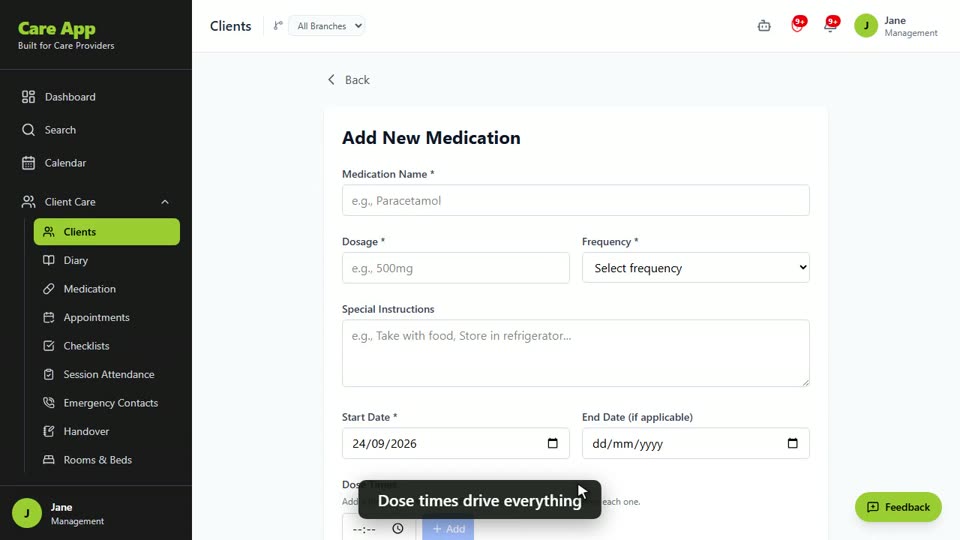
- Enter the Medication Name and Dosage, for example "Paracetamol" and "500mg".
- Choose the Frequency, for example Twice daily. For a medicine given only when needed, choose As needed (PRN).
- Add any Special Instructions, such as "Take with food".
- Set the Start Date, and an End Date if it is a short course.
- Under Dose Times, pick a time and press Add. Do this for every dose. A twice-daily medicine needs two times.
- Enter the Current Stock and a Low Stock Alert Threshold.
- Fill in Prescription Details: who prescribed it, the review date and the pharmacy.
- Check Medication is currently active is ticked and press Add Medication.
Dose times matter most. Without them, carers get no reminders, the medicine never shows as due, and missed doses are not caught. You will see "No dose times added - notifications will not be sent."
Good to know
- Only managers and team leaders can add or change medication.
- For weekly and fortnightly medicines, the start date sets the day of the week. For monthly medicines, it sets the day of the month.
- When stock falls to the alert threshold, managers get a "Low medication stock" notification.
- When a medicine is stopped, open it and press Deactivate rather than deleting it. Its records stay on the MAR chart.
- Add pharmacies under Care Quality, Pharmacies first if you want to pick one here.
- For PRN medicines, add a PRN protocol. See PRN medicines and the controlled drugs register.
Watch the guide video: Video 11: Medications, MAR charts and reorders (2:38)
Videos were recorded in September 2026, so a few screens may look slightly different today.
Still stuck? Email hello@care-app.uk and tell us which screen you were on. We aim to reply within a few hours.