Add shifts and client visits, repeat them, and check skills, holidays and working time before you save.
For managers
Add a shift
- In the sidebar, open Rota & Scheduling and choose Rota.
- Press Add Shift, or press + in the empty cell for the person and day so they are filled in for you.
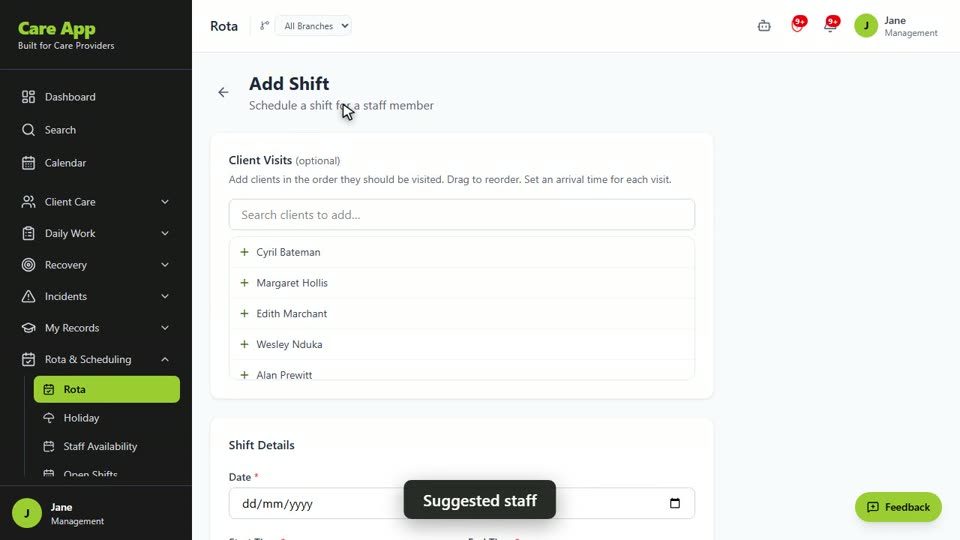
- Under Client Visits, search for each client and add them. Set an arrival time for each visit and add notes for the carer if needed. Drag visits into the right order.
- Under Shift Details, set the Date, Start Time and End Time.
- Add the Address / Location. Press Pin GPS for geofencing if you want Care App to check carers clock in at that place.
- Choose the Staff Member. Once a client and date are set, Care App suggests up to five people and shows who has the right skills.
- For a regular shift, tick Enable recurring, choose how it repeats and set Repeat Until.
- Press Save Shift (or Create Shifts for a recurring one). Use Save & Add Another to keep going.
Change the rota
- Drag a shift to another person or day.
- Use the buttons on a shift to Edit shift, Delete shift or Mark attendance.
- For a recurring shift, choose Delete this shift only or Delete the whole series.
Good to know
- There is no publish step. The carer is notified as soon as you save a shift, and again if you change it.
- Read the warnings before saving: skills mismatch, approved holiday, or a shift that overlaps one they already have.
- The rota flags Working Time Regulation issues: more than 48 hours in a week, or less than 11 hours' rest between long days.
- A shift that ends after midnight shows "Ends the next day".
- Each shift in a recurring series can be edited or deleted on its own.
- Carers only see their own shifts unless you turn on Show your schedule to staff.
Watch the guide video: Video 7: Building and running the rota (2:30)
Videos were recorded in September 2026, so a few screens may look slightly different today.
Still stuck? Email hello@care-app.uk and tell us which screen you were on. We aim to reply within a few hours.