Offer an uncovered shift to the team, and ask to swap a shift you cannot work.
For managers and carers
Post an open shift (managers)
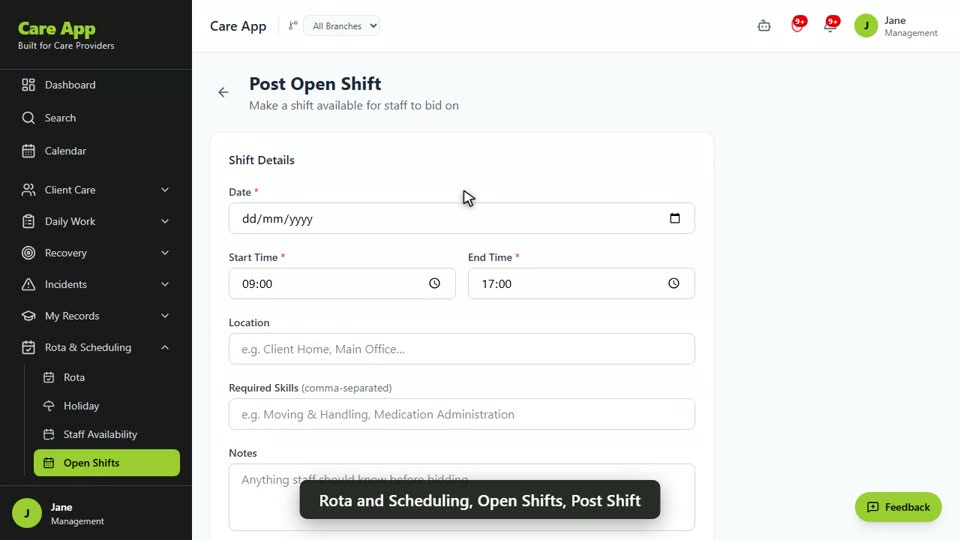
- In the sidebar, open Rota & Scheduling and choose Open Shifts.
- Press Post Shift. On the Post Open Shift form, fill in the shift details and press Post Shift.
- When staff bid, press Accept on the person you want. The shift shows "Filled by" their name.
Bid for an open shift (carers)
- Go to Rota & Scheduling, then Open Shifts.
- Press Bid on a shift you can work, then Submit Bid.
- You will see Bid placed. Your manager decides who gets it.
Ask to swap a shift (carers)
- Go to Rota and press Request shift swap on your shift.
- Give a Reason. Under Swap with, choose a colleague or leave it as Any available staff.
- Press Submit Request. Track it under My Swap Requests.
- If a colleague asks you, it appears under Incoming Swap Requests. Press Accept or Decline.
Approve a swap (managers)
- On the Rota, find Shift Swap Requests.
- Press Approve, Post as Open or Decline.
Good to know
- A swap is not final until a manager approves it. Keep to your original shift until then.
- Open shifts are included on the Professional and Max plans.
Watch the guide video: Video 8: Open shifts, bids and holiday (1:34)
Videos were recorded in September 2026, so a few screens may look slightly different today.
Still stuck? Email hello@care-app.uk and tell us which screen you were on. We aim to reply within a few hours.