See who is on shift right now, and check the timesheets that clocking in and out creates.
For managers
See who is on shift now
- In the sidebar, open Rota & Scheduling and choose Live Visits.
- Use By Staff to see each carer's progress, or By Client to see each visit as Complete, In progress or Pending.
Check timesheets
- In the sidebar, open Daily Work and choose Timesheets.
- A timesheet is started when a carer clocks in and closed when they clock out. Look for flags such as Late clock-in and Needs review.
- Check any Auto Out entries. These are shifts where the carer did not clock out. Use Edit Timesheet Entry to correct the times.
- Approve extra time where a carer asked for it. The entry shows the extension awaiting approval with an Approve button.
- If someone worked a shift but did not clock in, press Add Entry, or press Generate from Rota to create timesheets for shifts marked Present.
- Press Mark as absent for a shift that was not worked.
Good to know
- Payroll uses every completed timesheet that has not been rejected. Check timesheets before you run payroll.
- Manually added entries are marked manual.
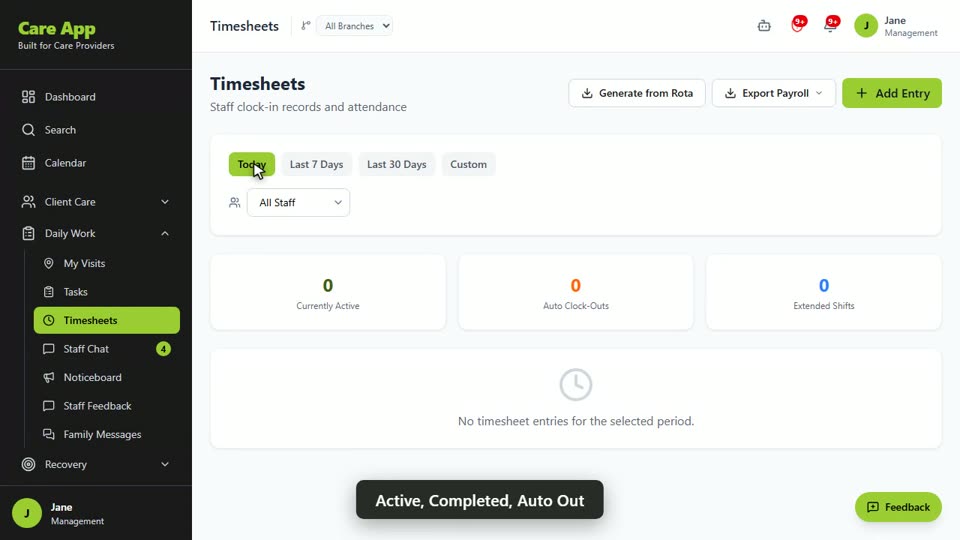
Watch the guide video: Video 9: Timesheets, shift types and extensions (2:12)
Videos were recorded in September 2026, so a few screens may look slightly different today.
For live visits and visit verification, see Video 10: Live visits, visit verification and QR check in (2:20).
Still stuck? Email hello@care-app.uk and tell us which screen you were on. We aim to reply within a few hours.