Tell Care App who regulates you and hide the parts of the app your service does not use.
For managers
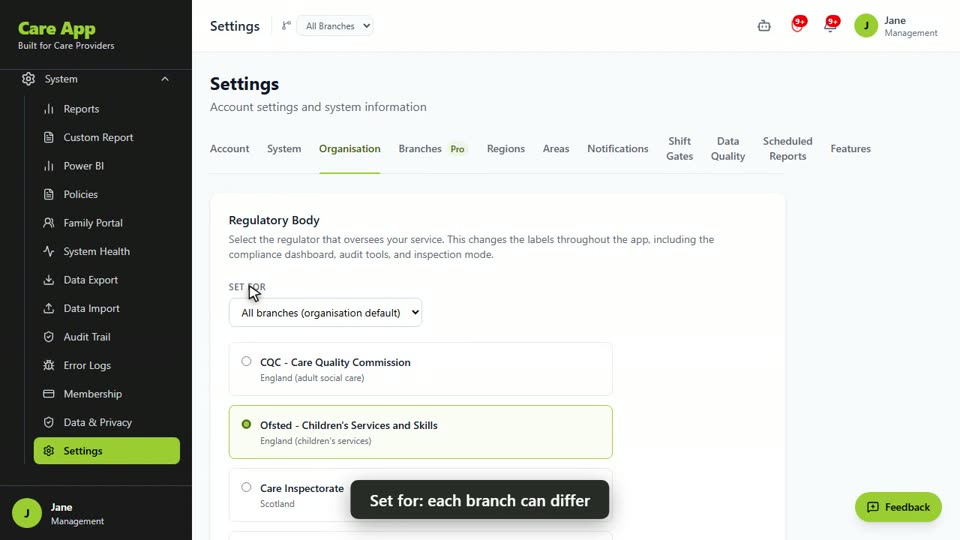
Set your regulatory body
- In the sidebar, open System and choose Settings.
- Open the Organisation tab.
- In the Regulatory Body card, choose who regulates you: CQC, Ofsted, Care Inspectorate, CIW or RQIA. If you do not carry out a regulated activity, choose Not required.
- You will see a message confirming the change.
Hide parts of the app you do not use
- In Settings, open the Features tab.
- Turn off anything your team does not need. It shows Hidden from sidebar.
Good to know
- Your regulator sets the names of the inspection tools in the menu, for example CQC Dashboard and CQC Evidence Pack.
- If you have branches in different nations, use Set for to give a branch its own regulator.
- Hiding a feature only removes it from the sidebar. Staff can still reach it from a direct link. Dashboard, Clients, Diary, Medication, Incidents, Timesheets and Settings are always shown.
- Only the Management role sees these tabs. Other managers only see the Account tab.
Watch the guide video: Video 4: Configuring Care App to fit your service (3:05)
Videos were recorded in September 2026, so a few screens may look slightly different today.
Still stuck? Email hello@care-app.uk and tell us which screen you were on. We aim to reply within a few hours.