The Get set up card on your dashboard lists the steps that get Care App working for your service, in the best order.
For managers
When you first sign in as a manager, your dashboard shows a card called Get set up. It lists each step, shows how many you have done ("3 of 7 steps done") and marks the one to do next with a Next step badge. Care App ticks each step off by itself when it sees the work done. You do not need to tick anything.
Steps
- Open Dashboard from the sidebar. The Get set up card is near the top.
- Find the step marked Next step. Read the short line under it that says why it matters.
- Press the Do it now button on that step. It takes you to the right screen.
- If you would rather watch first, press the Watch button. The guide video opens in a new tab.
- Come back to the dashboard. The step is ticked once Care App sees it done, and the next one is highlighted.
- Work through the list in order. When every step is done, the card goes away for good.
The steps and when they count as done
| Step | Button | Done when |
|---|---|---|
| Add your clients | Add a client | You have at least one real client |
| Add your team | Invite staff | At least one active staff member besides you |
| A carer signs in | See your staff | A staff member has signed in or recorded care |
| Write a care plan | Choose a client | A real client has a care plan |
| Put a shift on the rota | Add a shift | Someone has a shift on the rota |
| A carer records care | Add a care note | Someone other than you records a care note, a clock-in or a medication round |
| Set your regulatory body | Open Settings | You have saved your regulator in Settings |
Good to know
- Example records do not count. The client steps only tick once you add a real person.
- The Add your clients and Add your team steps also offer Import from a spreadsheet. If you would like us to check your spreadsheet first, email it to hello@care-app.uk.
- The Write a care plan step lets you add starter templates for your type of care. See Use starter templates.
- Open Settings lands on the Account tab. Your regulator is on the Organisation tab. If you do not carry out a regulated activity, choose Not required and the step disappears.
- Hide for today (or the X) hides the card until tomorrow. Hide for good appears 60 days after you sign up. Hiding only applies to the browser you are using.
- Team leaders see a shorter version of the card.
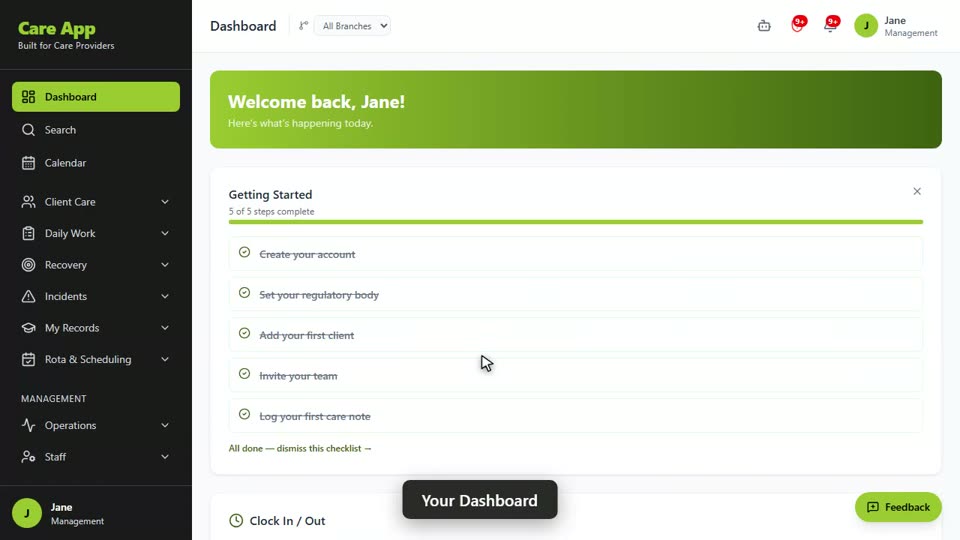
Watch the guide video: Video 1: Signing in and finding your way around (1:00)
Videos were recorded in September 2026, so a few screens may look slightly different today.
Still stuck? Email hello@care-app.uk and tell us which screen you were on. We aim to reply within a few hours.