Write a diary entry about the care you gave, by typing or by dictating.
For managers and carers
From the Diary
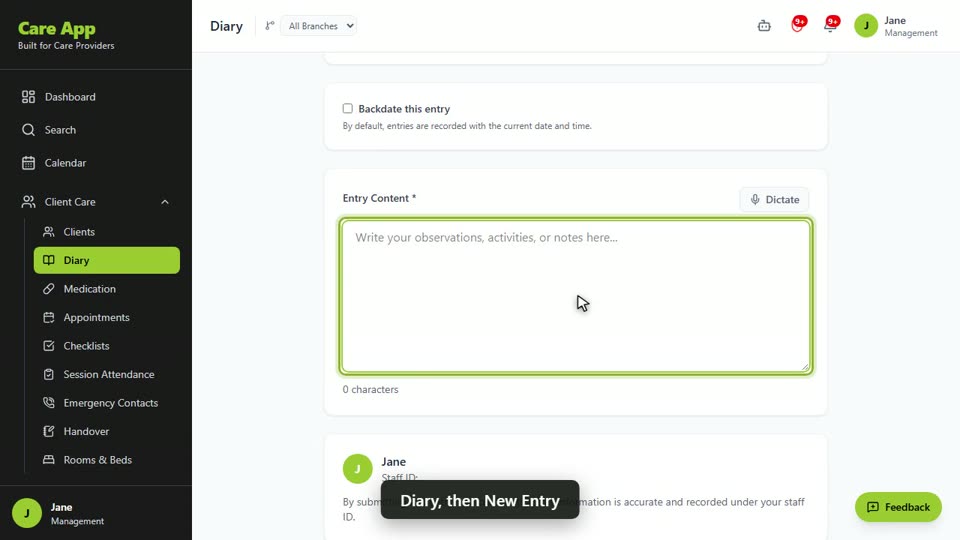
- In the sidebar, open Client Care and choose Diary.
- Press New Entry.
- Under Select Client, choose the person. If you started from their profile, this is already filled in.
- Choose a Category: General, Medical, Behavioral, Activity or Incident.
- Write what happened in Entry Content. To speak instead, press Dictate, talk, then press Stop. Check the text once it has been transcribed.
- If the note should not be seen by the family, tick Staff only.
- If you are writing it up later, tick Backdate this entry, set the date and time, and give a Reason for late entry.
- Press Submit Entry.
During a visit
- On the visit screen, scroll to Care Note.
- Write your note. If the family should not see it, tick Staff only: do not show this note to the family.
- Press Save Note. If you finish the visit or clock out with a note still in the box, Care App saves it first.
Good to know
- Once you submit a note, you cannot change it. Read it through first. If you spot a mistake, tell your manager or write a new note that corrects it.
- Only the Management role can edit a note. Edited notes show who changed them and when, and the earlier wording is kept with the note. Only managers can delete a note.
- Families with portal access see care notes and get an email about new ones. They never see incident notes or notes marked Staff only. Use Staff only for concerns about a relative or visitor.
- Write facts: what you saw, what you did and what the person said. Your note is saved under your staff ID.
- If you need the microphone for dictation and it is blocked, allow it in your phone's browser settings.
- An incident note is not an incident report. If something went wrong, also report an incident.
Watch the guide video: Video 3: Caring for a client day to day (2:51)
Videos were recorded in September 2026, so a few screens may look slightly different today.
Still stuck? Email hello@care-app.uk and tell us which screen you were on. We aim to reply within a few hours.